
EDU 106 · New Literacies

Learning
out loud.

A public record of what I try, make, question, revise, and learn while exploring digital texts, creative tools, and human-centered AI.

See the process

01 / Meet Angelica

Educator, mom, and lifelong learner.

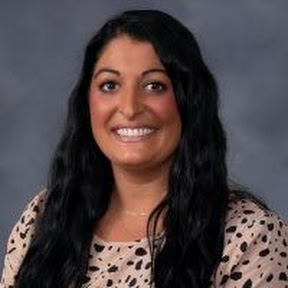
Portrait of Angelica Demers
Teaching with heart for five years

Hi, I’m Angelica—a 36-year-old educator, wife, and mom living in North Haven, Connecticut.

My husband, Bryan, and I have two children: Dominic, 11, and Isabella, 8. They both attend Hamden Hall Country Day School and play travel hockey and travel lacrosse, so much of our family time is spent cheering from the sidelines and traveling to tournaments.

For the past five years, I have worked at Hamden Hall as an associate teacher, and I also serve as the school’s Summer Academy director. I’m a member of the Hamden Hall Parents’ Association and am continuing my education so I can become a LEAD teacher at the school I love.

Outside the classroom, I love traveling, spending time with family and friends, attending my children’s games, relaxing at the beach, listening to the ocean waves, and settling in with a good book.

This is my public learning space for Dr. McVery’s EDU 106 course, New Literacies: Digital Texts and Tools for Lifelong Learning, at Southern Connecticut State University. Here, I’ll share the questions, revisions, feedback, and discoveries behind my work.

EducatorSummer Academy DirectorHockey & lacrosse momBeach reader
Course focusLearn something → Teach something → Do something

02 / Process posts

The work behind the work

Eight substantial posts will trace questions, evidence, feedback, revisions, and changes in my thinking.

Privacy + public identity

What should a public learning space reveal?

Publishing creates an audience, but it also creates responsibility. My first decisions are about what belongs online, how I want to represent myself, and how this design can make the learning—not my private information—the focus.

My first assignment is not just to make a webpage. It is to make a public learning space. That distinction matters because publishing changes both my audience and my responsibilities.

I chose to use my first name and course information while leaving out personal contact details. I want the site to show real learning—including confusion and revision—without treating privacy as an afterthought. The layout also keeps the focus on projects and process rather than a personal profile.

AI helped me generate the first version of the site from the syllabus. I did not want a finished page I could not explain, so my next step is to trace how the page structure, visual rules, and reflection windows work. I will record the changes I make and why I make them.

This version is a starting point. Before I call it mine, I need to test it, revise the language in my own voice, and decide what evidence of learning belongs here.

Read reflection

HTML + accessibility

Changing the code—and understanding why

I’ll document two visible HTML/CSS changes, test the site at another screen size, and explain how navigation, hierarchy, contrast, and alt text affect real readers.

Draft prompt: Describe two visible HTML or CSS changes you made by hand. What did each change do, and what did you learn from making it?

Add evidence from testing the navigation on another device or browser size. Include one accessibility choice involving headings, contrast, keyboard navigation, or alternative text.

Finish by explaining where AI helped you troubleshoot and what you can now do or explain independently.

Read reflection

Photography + visual truth

What changes when an image is edited?

A photo walk and original/edited comparisons will help me examine composition, visual storytelling, AI-assisted editing, disclosure, and the importance of preserving originals.

Draft prompt: Select images from your photo walk and explain the choices that connect them. What did light, framing, composition, or sequence help you communicate?

Compare an original with a conventionally edited version and an AI-assisted edit. Identify what changed, what improved, what became less truthful, and what you chose to keep.

Include meaningful alt text and a clear editing disclosure. Preserve your original files as evidence of the process.

Read reflection

Publishing + the open web

What changed when my posts became part of the open web?

Adding permanent links and an RSS feed changed how I think about publishing. My work is no longer trapped inside one page; readers can return to a specific reflection and follow new posts in a way they control.

Before this update, my reflections opened in pop-up windows. The site looked organized, but an individual post did not have its own address. That made it harder for someone to bookmark a reflection, share it, or return to it later. I learned that putting writing on a webpage is not quite the same as publishing it in a lasting, connected way.

Giving every post a permanent URL helped me understand the web differently. Each reflection now has its own identity and can stand on its own. The RSS feed also gives readers a way to follow new posts without depending on a social media platform or an algorithm to decide what they see.

I also added Microformats2 information for the title, author, date, link, and complete content of each post. These labels are not meant to change how the site looks. They help computers understand the structure that a reader can already see. I like that the original design and writing can stay the same while the site becomes more useful and accessible to different tools.

AI helped with the code and with checking that the feed and permanent links worked. My role was to decide what I wanted the site to do, make sure my original writing was preserved, and ask for features that support readers. This reminded me that using AI responsibly still requires clear goals, careful review, and an understanding of the result.

This process expanded my idea of new literacy. It includes writing and design, but it also includes understanding how digital tools organize and distribute our work. Now, when I add another post to the site, it can have its own permanent page and appear in the feed automatically. That makes the blog feel less like a single assignment and more like a learning space that can continue to grow.

Read reflection

03 / Semester portfolio

One site. Three movements.

  1. 01

    Learn something

    Photography portfolio, quantitative research brief, learning log, podcast, and qualitative mini-lab.

    In progress
  2. 02

    Teach something

    Connected-learning group essay, a focused five-minute Ignite talk, and an edited video.

    Ahead
  3. 03

    Do something

    A substantial public project using AI transparently to make myself, a community, or the wider world better.

    Ahead

AI Process Note · Website launch

AI helped build the starting structure. My job is to understand it, question it, and make it mine.

I used OpenAI’s Codex to turn the course requirements into an accessible, responsive website. I provided the syllabus and asked for a class blog. I accepted the visual system and page structure, then checked the wording against the syllabus. As the semester continues, I will replace draft reflections with my own experiences, verify claims and links, and document consequential changes.